Slapped and trapped the print in between
Hovered and suffered behind the seam
Coughed and roughed it up even further
Joined and coined this passage for the team:
Take a break
Make a mistake
Jump in the lake
Fight a snake
Ride an earthquake
Bake a cake
Eat a steak
Give it a shake
For heaven’s sake
Look at what’s at stake
And numb that ache
No matter what it’ll take
I have a 64GB SanDisk Extreme USB flash drive that I use for just about
anything. It is a USB 3.0 drive and at the time of purchase, it had the
best performance out of all drives in the market.
I can’t remember how fast it was exactly when I first bought it but I
remember the read speed was above 200 MB/s and write was above 150 MB/s.
But yesterday, a year or so after purchase, I had write speeds of 20
MB/s sometimes falling to 6 MB/s. I wasn’t surprised as I knew at some
point all the blocks will be written to and due to lack of support for
TRIM, things will get slow — didn’t think that slow!
How do I know it doesn’t support TRIM? If I format and mount an FS with
discard mount option and subsequently run
fstrim /mnt where /mnt
is the mount point of the volume, I get this:
fstrim: /mnt: the discard operation is not supported
OK, but not all hope is lost. I knew about ATA Secure Erase
command. What if that works? Turns out it does and it works so well. I
followed the kernel
guide but here is a summary of commands I ran (change
/dev/X to appropriate dev) for the impatient. I
strongly recommend reading the full guide.
Latest version of Inkscape supports exporting links now so no
more need for this tool.
Inkscape despite being the most wonderful vector graphics editor
program out there, has bummed me every time I tried to export something
as PDF with hyperlinks in it. Inkscape does support adding links to
arbitrary objects but in the conversion process to PDF, that metadata is
lost. The reason for this loss (persumably) is that Cairo, a solely
graphics rendering library used by Inkscape for outputting PDF, has no
notion of object metadata. It just draws stuff to various types of
canvas, like bitmaps, PDF, etc.
The final PDF generated by svglinkify which has clickable hyperlinks.
See the source SVG
file and the Inkscape exported PDF based on which the above is generated.
Being lazy (good thing) and not knowledgeable enough about Inkscape
development, I set out to fix this problem quickly such that it can help
me (and others) here and now, not in some unknown time in the future.
This smells like it requires hackery and that’s exactly right. With less
than 200 lines of python code, I made a very simple script that
takes an SVG and a PDF of that SVG made by Inkscape, and creates a final
PDF that has clickable hyperlinks. The SVG needs some simple treatment
which is described in detail in the header comments of the python
script. I have also made a demo SVG, and the PDF output of the script
which can be seen on the right.
You can get svglinkify from my
repo. You need python 2 or 3, qpdf and of course
Inkscape to make everything work.
I got myself a PureGear Extreme USB Wall Charger few months ago.
It’s Quick Charge 2.0 (QC2.0) enabled. But it didn’t live up to the claims
made by Qualcomm to charge from 0% to 60% in 30 minutes. So I
figured either the charger wasn’t doing what it promised to, or my phone
was the culprit. Gotta find out which.
In a non-QC2.0 charger that conforms to USB Charging
Specification, a certain resistance is connected across the USB
data lines. When a phone is plugged in, the phone measures this
resistance to find out how much current it’s allowed to draw from the
charger. The voltage is always 5V. Lower the resistance means higher
maximum current draw allowed. A resistance of 0Ω means draw as much as
you want.
Up my game
Down-level an amount worthy of my fame
Disengage from the roaring torque of your engine
Disparage my opponents, call them names
Up my game
Reid this empty house, rape it with an emptier flame
Deceive me with your age old finest deceit
Revel as I break and fall to my knees
Up my game
Deplete the building desire to dismiss it as vain
Exert a microscopic effort to advance me
An extra breath for you, means the world to me
Up my game
Bear the burden that what you do is lame
Agitate your friends, and save me the calm you
Wholeheartedly laugh when pain is flowing through you
Up my game
Train me until I’m clean and tame
Play me, whisper to me who knows whom to blame?
Frame me with good intentions, a noble aim
Up my game
But quash the thought of me doing you the same
Bet on your life that for the rest of it you will regret
spending a single moment, upping my game
We have a Volkswagen Polo that is a few years old. The bluetooth setup
on this car is a disaster.
The car itself has bluetooth and it can play music over A2DP profile,
make and receive phone calls over HFP profile and it can even download
your phonebook and some more. Enter Touch Adapter Voice 2, a cell
phone sized device that sits in a dock on the passenger side. Without
it, the car refuses to connect to any bluetooth device. So you’d think
leaving it in the dock is all that’s needed. Wrong. The Touch Adapter
also has bluetooth, and just like a phone, it tries to connect to the
car over it. But of course only one device can be connected at a time,
so getting one’s phone connected is a gamble. I hear you ask: why the
hell does the Touch Adapter need to talk to car over bluetooth? Who
knows?!! It acts like a relay between the phone and the car. What? Relay
bluetooth? Yep! Folks at Volkswagen are on something heavy. Did I
mention that in the relay configuration, music playback is gone? Yep.
I’m not even sure if it’s legal to advertise the car as A2DP capable
when that functionality works only sometimes.
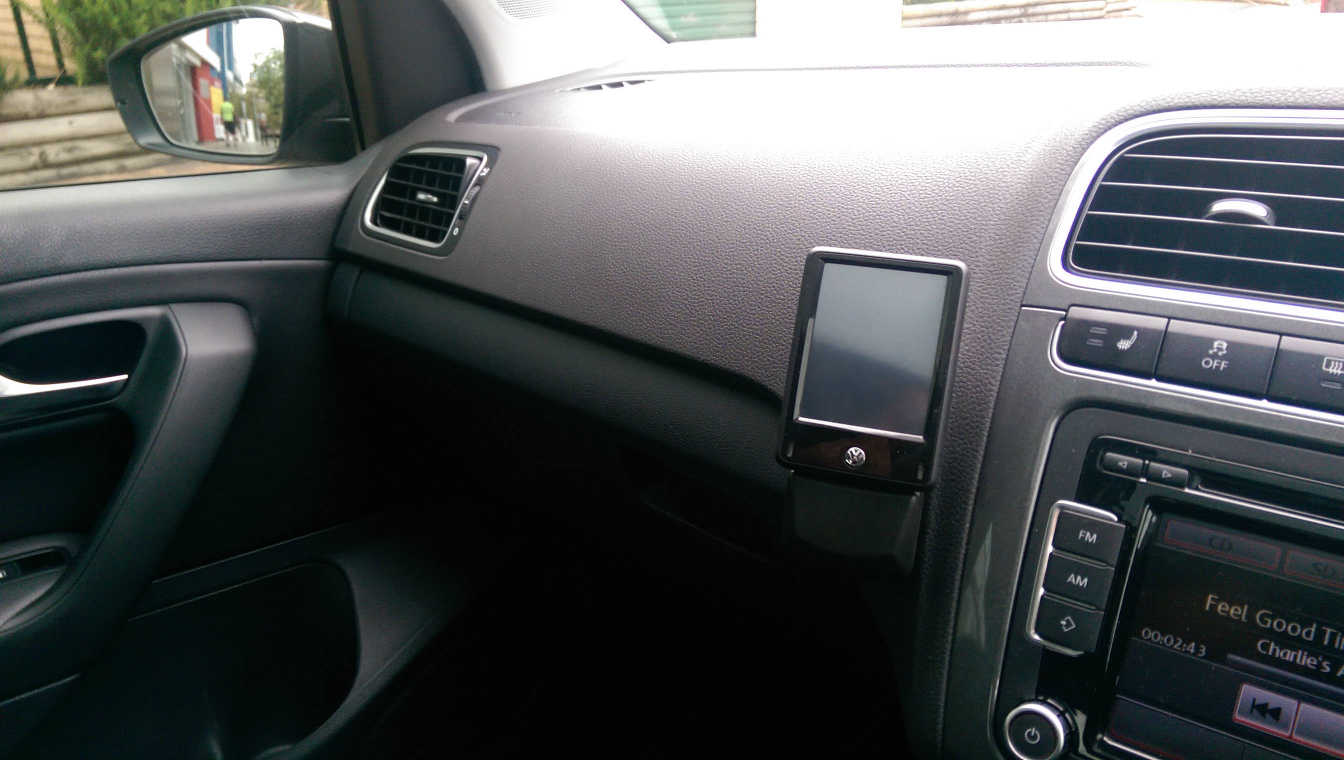
Touch Adapter in its dock. And no, this is not a self driving car
without a steering wheel. We don’t sit on the wrong side of the car like
some do. ☺
I own an Audioengine D1
DAC which I love. It’s
very Appley in design. Since I bought it two years ago, I have
continously learnt to notice ever so subtle differences in quality of
music playback, to the point that I can easily tell apart compressed and
uncompressed music, and somewhat the difference between new and used
equipment. A double blind test is definitely in order to prove the above
abilities.
Recently reading over the spec of my D1 DAC, I saw that it resamples
everything to 24bit/96Khz for playback. From past knowledge, I knew that
resampling is a very complex and resource hungry operation and the small
silicon inside the DAC cannot possibly do the best that can be done. So
after a bit of searching online, I managed to force Pulseaudio on my
Linux machine to always stream 24/96 bitstream to my DAC, and do
software resampling on my main CPU. It sure is a power hungry process.
The highest quality sampler, src-sinc-best-quality eats up 40% of
my one core of a Xeon 3.2Ghz CPU! And that’s per stream, so if I have
music playing and watch a youtube video, that’s one CPU core gone.
src-sinc-medium-quality drops the usage by more than half, to 13%
without any noticable difference.
BPAY is an electronic bill payment system in Australia which
enables payments to be made through a financial institution’s online or
telephone banking facility to merchants who are registered BPAY
billers.
BPAY, Wikipedia
To pay for a bill, you need a Biller Code and Reference
Code which are numbers with varying number of digits. This
information is printed on the paper bills for instance where you can use
them when paying for the bill online. It’s only recently that BPAY has
rolled out a QR Code standard to ease the entering of these numbers in
bank phone apps.
I wanted to know how the BPAY information was encoded so I could
transfer my existing Biller and Reference codes to my phone without
manual error. Unfortunately I couldn’t find anything online. The easiest
way I thought was to figure out how my phone app reads it. The only bank
right now that has an app with BPAY QR
Code scanning functionality is Commonwealth Bank. So I copied the
app out of the phone, disassembled it using apktool and went
digging.
I lost my credit card a few days ago and as soon as I realized that, I
called up my bank. When searching for the right number to call, I went
to their website and found my way to the contact page. As I was dialing
the first digits of the number, I noticed something seriously wrong: the
page was not secure (ie no HTTPS). I stopped. I began googling the phone
number and only after seeing it on several places did I call the number
to order a new card.
After the call, I wondered if it was only my bank. I was saddened to see
that out of 40 banks and credit card providers in Australia, only 7
had secure contact pages. I have notified most of the others about
the issue.
If your bank is one of those with non-secure contact pages listed
further down the page, you should do a little research online first
before trusting the information on those pages.